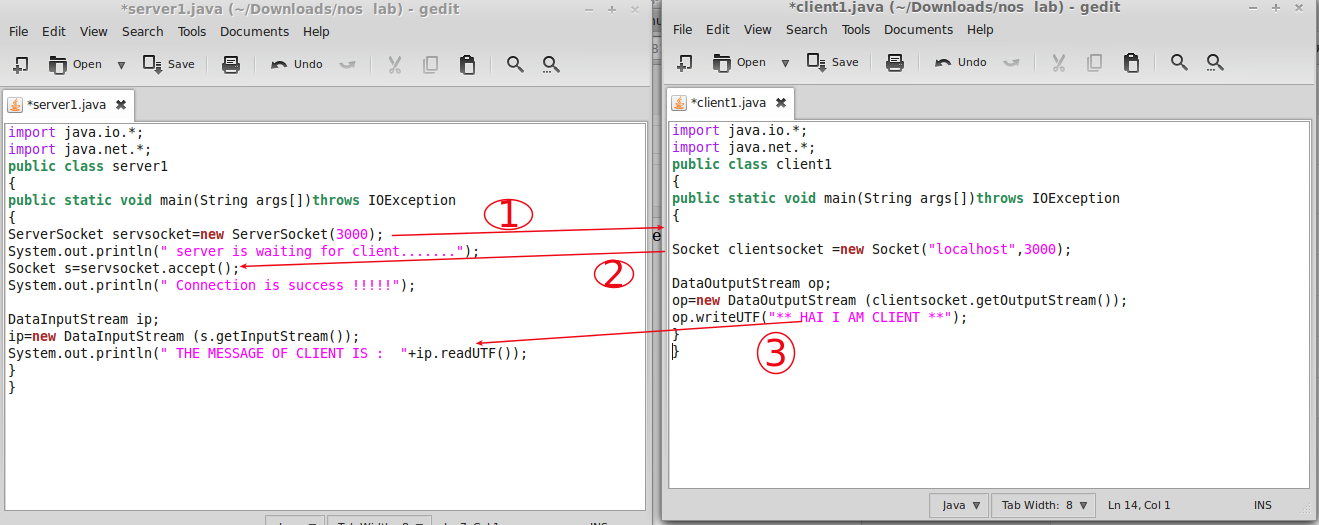
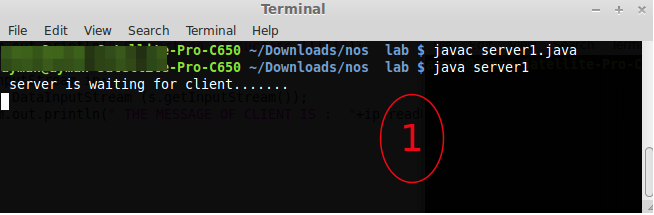
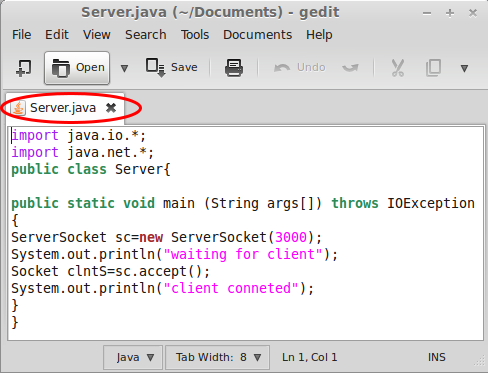
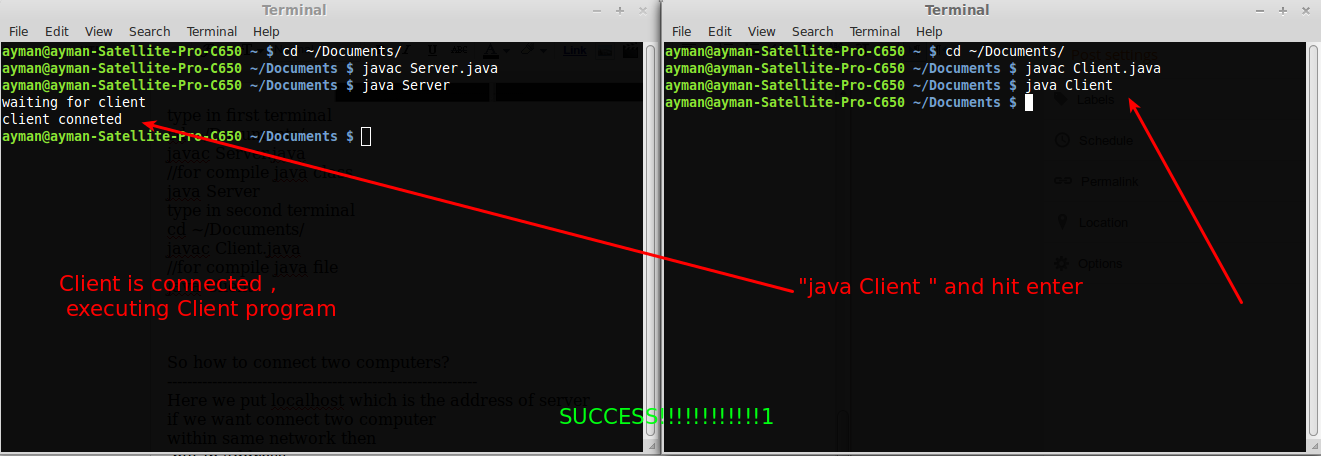
Create serverForm
Name it "Formserver"
click finish
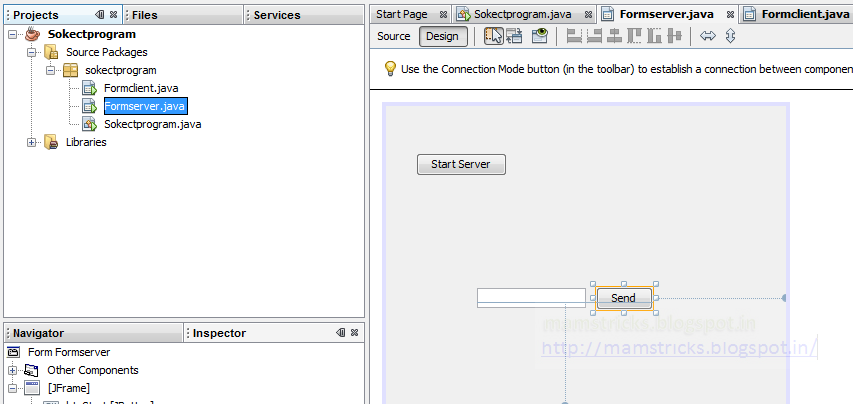
Now we get beutiful jframe form :-)
add a button from palette by "clicking and dragging"
Now name button to "start server"
By Right click on button->Edit text->
Now we can change the variable of button->"btnStart"
then click ok
Goto formserver->source code section->
type
    ServerSocket server=null;
    Socket Client=null;
    DataOutputStream dos=null;
    DataInputStream dis=null;
Now got design section->Right click on button
select "action performed"
or double click on the button
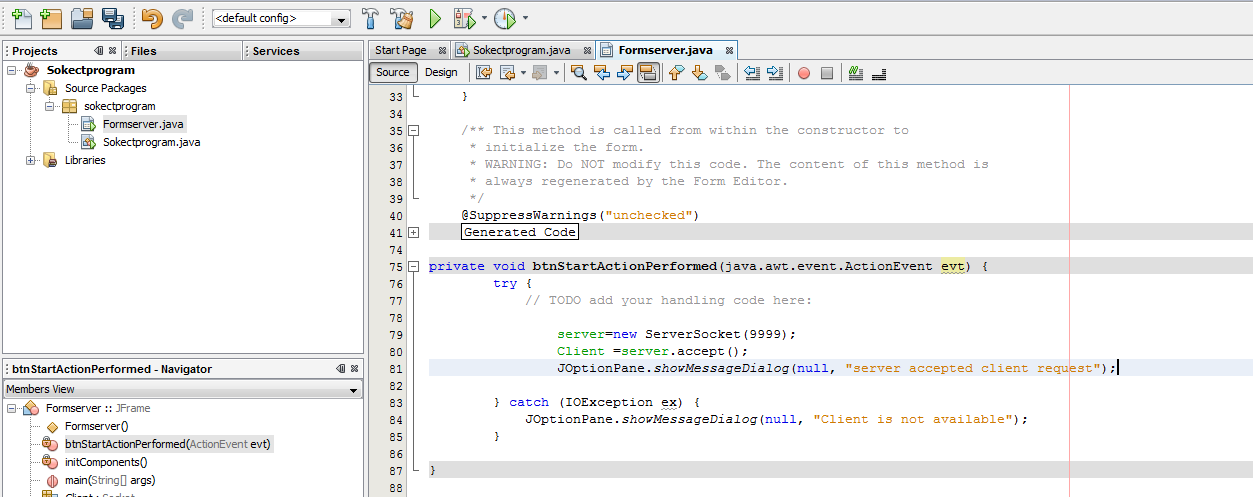
Now we get coding section on button
type this code
To recover error just click that "error bulb"
it give suggestion to put try catch block so click that
Now error dissappeared :-)
            try {
                server=new ServerSocket(9999);
                Client =server.accept();
                JOptionPane.showMessageDialog(null, "server accepted client request");
                dos=new DataOutputStream(Client.getOutputStream());
        } catch (IOException ex) {
            JOptionPane.showMessageDialog(null, "Client is not available");
        }
Now goto project explorer
Now goto project explorer
Add button change variable name to "btnconnect" change edit text to "connect"
Now goto Form client source code window type this
or copy paste this
""""""""""""""""""""""""""""""""""""""""""""""""""""""""""""""""""
Socket server=null;
DataOutputStream dos=null;
DataInputStream dis=null;
"""""""""""""""""""""""""""""""""""""""""""""""""""""""""""""""""'""""

Now Double click on Connect button
copy paste this
        try {
            server=new Socket("localhost", 9999);
            JOptionPane.showMessageDialog(null, "Server connected");
            dis=new DataInputStream(server.getInputStream());
        } catch (UnknownHostException ex) {
             JOptionPane.showMessageDialog(null, "Connection failed :-( ");
        } catch (IOException ex) {
              JOptionPane.showMessageDialog(null, "Connection failed :-( ");
        }
""""""""""""""""""""""""""""""""""""""""""""""""""""""""""""""""""
Now add one more button(edit text:send,variable name:btnsend) by draggging to Formserver.java
add textfield(variable name:txtmsgsend
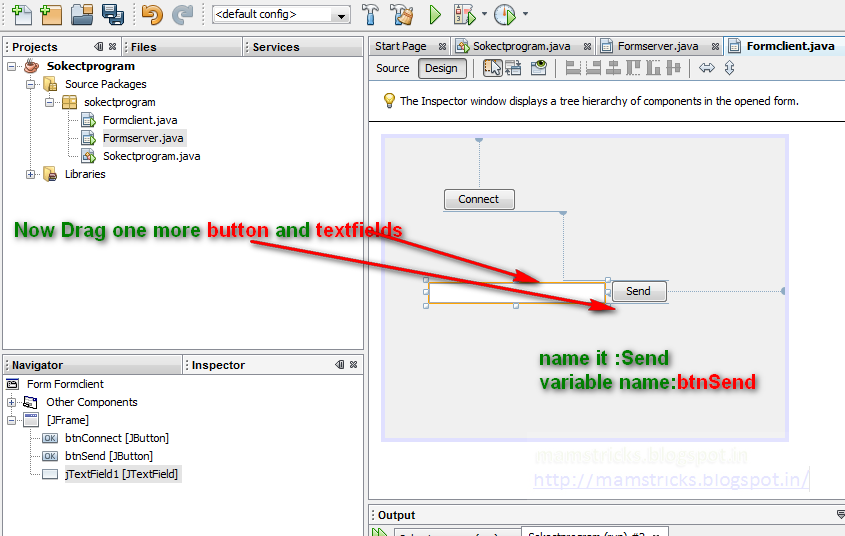
double click on send button
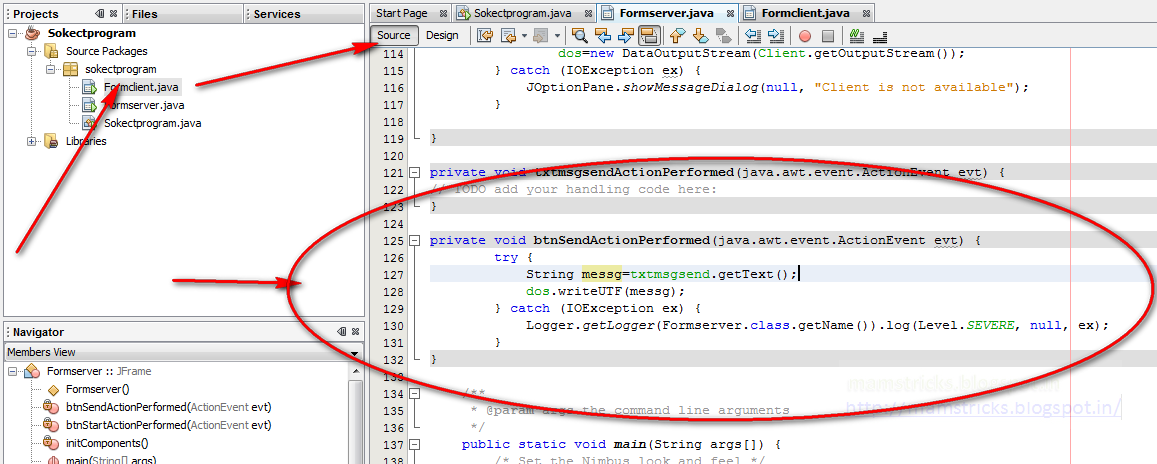
type this
or copy paste
""""""""""""""""""""""""""""""""""""""""""""""""""""""""""""""""""""""
       try {
            String messg=txtmsgsend.getText();
            dos.writeUTF(messg);
        } catch (IOException ex) {
            Logger.getLogger(Formserver.class.getName()).log(Level.SEVERE, null, ex);
        }
Now goto Formserver.java
Now add one more button(edit text:Recieve,variable name:btnrecieve) by draggging to Formserver.java
add textfield(variable name:txtmsgrec)
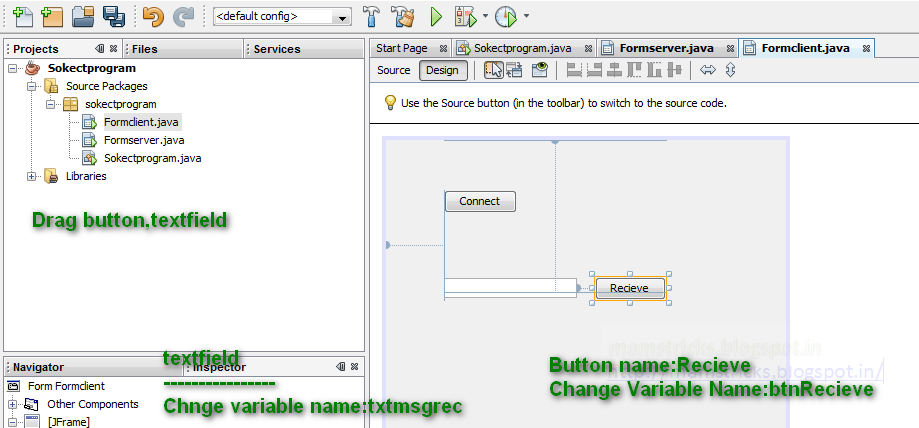
Double click on Recieve button copy paste this code
           try {
            String msg=dis.readUTF();
            txtmsgrec.setText(msg);
         } catch (IOException ex) {
            Logger.getLogger(Formclient.class.getName()).log(Level.SEVERE, null, ex);
        }
////////////////////////////////////////////////////////////////////////////////////////////////////////////////////////////
Now you can see full code and Design of the forms below
Formserver Code
-----------
        import java.io.DataInputStream;

import java.io.DataOutputStream;
import java.io.IOException;
import java.net.ServerSocket;
import java.net.Socket;
import java.util.logging.Level;
import java.util.logging.Logger;
import javax.swing.JOptionPane;
public class Formserver extends javax.swing.JFrame {
    ServerSocket server=null;
    Socket Client=null;
    DataOutputStream dos=null;
    DataInputStream dis=null;
    public Formserver() {
        initComponents();
    }
    @SuppressWarnings("unchecked")
    //
    private void initComponents() {
        btnStart = new javax.swing.JButton();
        btnSend = new javax.swing.JButton();
        txtmsgsend = new javax.swing.JTextField();
        setDefaultCloseOperation(javax.swing.WindowConstants.EXIT_ON_CLOSE);
        btnStart.setText("Start Server");
        btnStart.addActionListener(new java.awt.event.ActionListener() {
            public void actionPerformed(java.awt.event.ActionEvent evt) {
                btnStartActionPerformed(evt);
            }
        });
        btnSend.setText("Send");
        btnSend.addActionListener(new java.awt.event.ActionListener() {
            public void actionPerformed(java.awt.event.ActionEvent evt) {
                btnSendActionPerformed(evt);
            }
        });
        txtmsgsend.setText(" ");
        txtmsgsend.addActionListener(new java.awt.event.ActionListener() {
            public void actionPerformed(java.awt.event.ActionEvent evt) {
                txtmsgsendActionPerformed(evt);
            }
        });
        javax.swing.GroupLayout layout = new javax.swing.GroupLayout(getContentPane());
        getContentPane().setLayout(layout);
        layout.setHorizontalGroup(
            layout.createParallelGroup(javax.swing.GroupLayout.Alignment.LEADING)
            .addGroup(layout.createSequentialGroup()
                .addGap(30, 30, 30)
                .addComponent(btnStart)
                .addContainerGap(279, Short.MAX_VALUE))
            .addGroup(javax.swing.GroupLayout.Alignment.TRAILING, layout.createSequentialGroup()
                .addGap(91, 91, 91)
                .addComponent(txtmsgsend, javax.swing.GroupLayout.DEFAULT_SIZE, 109, Short.MAX_VALUE)
                .addPreferredGap(javax.swing.LayoutStyle.ComponentPlacement.UNRELATED)
                .addComponent(btnSend)
                .addGap(133, 133, 133))
        );
        layout.setVerticalGroup(
            layout.createParallelGroup(javax.swing.GroupLayout.Alignment.LEADING)
            .addGroup(layout.createSequentialGroup()
                .addGap(47, 47, 47)
                .addComponent(btnStart)
                .addPreferredGap(javax.swing.LayoutStyle.ComponentPlacement.RELATED, 111, Short.MAX_VALUE)
                .addGroup(layout.createParallelGroup(javax.swing.GroupLayout.Alignment.BASELINE)
                    .addComponent(btnSend)
                    .addComponent(txtmsgsend, javax.swing.GroupLayout.PREFERRED_SIZE, javax.swing.GroupLayout.DEFAULT_SIZE, javax.swing.GroupLayout.PREFERRED_SIZE))
                .addGap(96, 96, 96))
        );
        pack();
    }//
private void btnStartActionPerformed(java.awt.event.ActionEvent evt) {
        try {
               server=new ServerSocket(9999);
                Client =server.accept();
                JOptionPane.showMessageDialog(null, "server accepted client request");
                dos=new DataOutputStream(Client.getOutputStream());
        } catch (IOException ex) {
            JOptionPane.showMessageDialog(null, "Client is not available");
        }
}
private void txtmsgsendActionPerformed(java.awt.event.ActionEvent evt) {
}
private void btnSendActionPerformed(java.awt.event.ActionEvent evt) {
        try {
            String messg=txtmsgsend.getText();
            dos.writeUTF(messg);
        } catch (IOException ex) {
            Logger.getLogger(Formserver.class.getName()).log(Level.SEVERE, null, ex);
        }
}
        public static void main(String args[]) {
        java.awt.EventQueue.invokeLater(new Runnable() {
            public void run() {
                new Formserver().setVisible(true);
            }
        });
    }
    // Variables declaration - do not modify
    private javax.swing.JButton btnSend;
    private javax.swing.JButton btnStart;
    private javax.swing.JTextField txtmsgsend;
    // End of variables declaration
}

Formclient Code
import java.io.DataInputStream;
import java.io.DataOutputStream;
import java.io.IOException;
import java.net.Socket;
import java.net.UnknownHostException;
import java.util.logging.Level;
import java.util.logging.Logger;
import javax.swing.JOptionPane;
public class Formclient extends javax.swing.JFrame {
    Socket server=null;
    DataOutputStream dos=null;
    DataInputStream dis=null;
    public Formclient() {
    initComponents();
    }
    @SuppressWarnings("unchecked")
    //
    private void initComponents() {
        btnConnect = new javax.swing.JButton();
        btnRecieve = new javax.swing.JButton();
        txtmsgrec = new javax.swing.JTextField();
        setDefaultCloseOperation(javax.swing.WindowConstants.EXIT_ON_CLOSE);
        btnConnect.setText("Connect");
        btnConnect.addActionListener(new java.awt.event.ActionListener() {
            public void actionPerformed(java.awt.event.ActionEvent evt) {
                btnConnectActionPerformed(evt);
            }
        });
        btnRecieve.setText("Recieve");
        btnRecieve.addActionListener(new java.awt.event.ActionListener() {
            public void actionPerformed(java.awt.event.ActionEvent evt) {
                btnRecieveActionPerformed(evt);
            }
        });
        javax.swing.GroupLayout layout = new javax.swing.GroupLayout(getContentPane());
        getContentPane().setLayout(layout);
        layout.setHorizontalGroup(
            layout.createParallelGroup(javax.swing.GroupLayout.Alignment.LEADING)
            .addGroup(layout.createSequentialGroup()
                .addGap(58, 58, 58)
                .addGroup(layout.createParallelGroup(javax.swing.GroupLayout.Alignment.LEADING)
                    .addGroup(layout.createSequentialGroup()
                        .addComponent(txtmsgrec, javax.swing.GroupLayout.PREFERRED_SIZE, 133, javax.swing.GroupLayout.PREFERRED_SIZE)
                        .addGap(18, 18, 18)
                        .addComponent(btnRecieve))
                    .addComponent(btnConnect))
                .addContainerGap(120, Short.MAX_VALUE))
        );
        layout.setVerticalGroup(
            layout.createParallelGroup(javax.swing.GroupLayout.Alignment.LEADING)
            .addGroup(layout.createSequentialGroup()
                .addGroup(layout.createParallelGroup(javax.swing.GroupLayout.Alignment.LEADING)
                    .addGroup(layout.createSequentialGroup()
                        .addGap(50, 50, 50)
                        .addComponent(btnConnect))
                    .addGroup(layout.createSequentialGroup()
                        .addGap(137, 137, 137)
                        .addGroup(layout.createParallelGroup(javax.swing.GroupLayout.Alignment.BASELINE)
                            .addComponent(txtmsgrec, javax.swing.GroupLayout.PREFERRED_SIZE, javax.swing.GroupLayout.DEFAULT_SIZE, javax.swing.GroupLayout.PREFERRED_SIZE)
                            .addComponent(btnRecieve))))
               .addContainerGap(140, Short.MAX_VALUE))
        );
        pack();
    }//
private void btnConnectActionPerformed(java.awt.event.ActionEvent evt) {
        try {
            server=new Socket("localhost", 9999);
            JOptionPane.showMessageDialog(null, "Server connected");
            dis=new DataInputStream(server.getInputStream());
        } catch (UnknownHostException ex) {
             JOptionPane.showMessageDialog(null, "Connection failed :-( ");
        } catch (IOException ex) {
              JOptionPane.showMessageDialog(null, "Connection failed :-( ");
        }
}
private void btnRecieveActionPerformed(java.awt.event.ActionEvent evt) {
        try {
            String msg=dis.readUTF();
            txtmsgrec.setText(msg);
        } catch (IOException ex) {
            Logger.getLogger(Formclient.class.getName()).log(Level.SEVERE, null, ex);
        }
}
    public static void main(String args[]) {
             //
        /* If Nimbus (introduced in Java SE 6) is not available, stay with the default look and feel.
         * For details see http://download.oracle.com/javase/tutorial/uiswing/lookandfeel/plaf.html
        */
        try {
            for (javax.swing.UIManager.LookAndFeelInfo info : javax.swing.UIManager.getInstalledLookAndFeels()) {
                if ("Nimbus".equals(info.getName())) {
                    javax.swing.UIManager.setLookAndFeel(info.getClassName());
                    break;
                }
            }
        } catch (ClassNotFoundException ex) {
            java.util.logging.Logger.getLogger(Formclient.class.getName()).log(java.util.logging.Level.SEVERE, null, ex);
        } catch (InstantiationException ex) {
            java.util.logging.Logger.getLogger(Formclient.class.getName()).log(java.util.logging.Level.SEVERE, null, ex);
        } catch (IllegalAccessException ex) {
            java.util.logging.Logger.getLogger(Formclient.class.getName()).log(java.util.logging.Level.SEVERE, null, ex);
        } catch (javax.swing.UnsupportedLookAndFeelException ex) {
           java.util.logging.Logger.getLogger(Formclient.class.getName()).log(java.util.logging.Level.SEVERE, null, ex);
       }
        //
             java.awt.EventQueue.invokeLater(new Runnable() {
            public void run() {
                new Formclient().setVisible(true);
            }
        });
    }
    // Variables declaration - do not modify
    private javax.swing.JButton btnConnect;
    private javax.swing.JButton btnRecieve;
    private javax.swing.JTextField txtmsgrec;
    // End of variables declaration
}