Tuesday, 9 March 2021

cmd useful commands

to rename all files in a folder from 11-42 


for /l %f in (10,1,42) do ren *.JPG  own.ll.exp%f.JPG

Tuesday, 15 January 2019


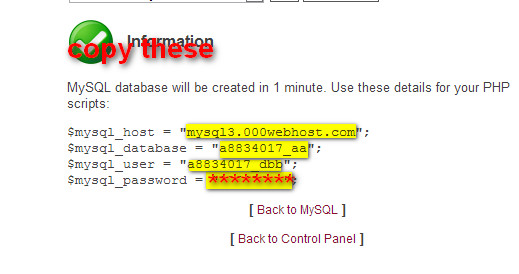
Hosting wordpress using filezilla tutorial based on screenshot

STEP 1
First you want to create an Account
so go to http://000webhost.com/

STEP 2
Now give necessary information→THEN CREATE YOU ACCOUNT


Thursday, 3 January 2019

Kotlin Basics ,variables and data types Tutorial 2

String variable

var myVar="Hello world"  

var myVar:String
myVar="Hello World"

Integer variable

var MyVar=10

Decimal/Float variable

var myVar=1.0

For constant value variable

val myVar="Helloworld"
myVar="is not changed"

print(myVar)→output is Helloworld

Ranges
Using Double dots

val Myvar=1..10 // ranges from 1,2,3,4,.....9,10
val Myvar=1.rangesTo(10) // ranges from 1,2,3,4,.....9,10

Using downTo
val Myvar=10 downTo 1 //ranges from 10,9,8,7...3,2,1
val Myvar=10.downTo(1) //ranges from 10,9,8,7...3,2,1

Using steps
val Myvar=10 downTo 1 step 2 // ranges fro 10,8,6,4,2

Using alphabets
val Myvar="a"..."z" //ranges from a,b,c,d,.....z
val Myvar='a'...'z' //ranges from a,b,c,d,.....z
Checking a value in range variable
var MyvarinMyvar='a' in Myvar //checking a in Myvar 


If else expression
 val a=2
val b=3

if(a>b)
c=10
else
c=50
print(c)

or we can define same code in different way

 val a=2
val b=3

var c:int=if(a>b)
a
else
b
print(c)


When and case
when(a)
{
   1->print("a is 1")
   2->print("a is 2")
    else->print("a is unknown")
   }

FOR LOOP
java
for(i=0;i<10;i++)
{
System.out.println("Hello world");
}

Kotlin
for(initializer in ranges)

for(i in 1..10)
{
println("Hello world")
}

WHILE LOOP

while(i>5)
{
print("Hello world")
i++
}

DO WHILE LOOP

do
{
print("Hello world")
i++
}
while(i>5)

RETURN STATEMENT

fun max(a;int,b int):Int
{
if(a>b)
return a
else
return b
}

or you can define return statement using equal to simply by

fun max(a;int,b int):Int
{
=if(a>b)
 a
else
 b
}

printing variable
print("a is larger" $a)


Return statements using apply


fun main(args:Array<String>)
{
var man=man()

man.apply{  // Using apply we can avoid man.name="Ameen" and man.age=29
age=29
name="Ameen"
}. Startrun()  //here we can run function too in with we can't use this method


//we can also use with as like apply but dot function name can;t be applied at last for running function
man.apply{  // Using apply we can avoid man.name="Ameen" and man.age=29
age=29
name="Ameen"
}

}
class man{
var age:Int=1
var name:String="John"

fun Startrun(){
print("Now my name is $name")
}

}


Monday, 5 November 2018

Kotlin Basics Tutorial 1

Creating a main function in Kotlin and Java

Java
we need to create class then want to add following function

 public static void main(String[] args){} 
Kotlin
we don't need to create class,just add function 

       
fun main(args: Array<String>){}


or we can add :Unit instead of void in java


fun main(args: Array<String>): Unit{}


For returning type int


fun main(args: Array<String>): Int{}


For printing just type

print("Hello World")


/***************************************************************/

For printing Hello World in java ,we need first create a class in java then followed my main class
Java


public class MyClass{
public static void main(String[] args){
System.out.println("Hello World");
}
}


In Kotlin we don't need to create class , just create function defining fun...and not need any semicolon for ending command, Kotlin compiler internally create class for function while running the program


fun main(args: Array<String>){
print("Hello World")
}


LESSON 3 Factorial of a number using recursion C Programming

Factorial of a number using recursion

#include<stdio.h>
#include<conio.h>
int fact(int);
void main()
{
int n,f;
clrscr();
printf("Enter the limit");
scanf("%d",&n);
f=fact(n);
printf("factorial is %d",f);
getch();
}
int fact(int x)
{
int p;
if(x==0)
return(1);
else
{
p=x*fact(x-1);
}
return(p);
}

LESSON 4 Checking whether a string palindrome C Programming

Cheking whether a string palindrome

#include<stdio.h>
#include<conio.h>
#include<string.h>
void main()
{
 int n,i,flag=0,j;
 char a[32];
 clrscr();
 printf("enter the string");
 scanf("%s",a);
 n=strlen(a);
 for(i=0,j=n-1;(i<n)&&(j>0);j--,i++)
  {
     if(a[i]!=a[j])
       flag=1;
  }
     if(flag==1)
     printf("the string is not palindrom");
     else
     printf("the string is palindrome");
     getch();
}

LESSON 5 Product of two matrix C Programming

Product of two matrix

#include<stdio.h>
#include<conio.h>
void main()
{
int m,n,p,q,i,j,k,a[20][20],b[20][20],c[20][20];
clrscr();
printf("enter the no of rows & columnsof matrix 1\n");
scanf("%d%d",&m,&n);
if(m==0||n==0)
{
printf("matrix is not possible");
}
printf("enter the array elements\n");
for(i=0;i<m;i++)
{
for(j=0;j<n;j++)
{
scanf("%d",&a[i][j]);
}
}
printf("enter the no of rows & columnsof matrix 2\n");
scanf("%d%d",&p,&q);
if(p==0||q==0)
{
printf("matrix is not possible");
}
printf("enter the array elements\n");
for(i=0;i<p;i++)
{
for(j=0;j<q;j++)
{
scanf("%d",&b[i][j]);
}
}
printf("the  matrix 1 is \n\n");
for(i=0;i<m;i++)
{
for(j=0;j<n;j++)
{
printf("%d\t",a[i][j]);
}
printf("\n\n\n");
}
printf("the  matrix 2 is \n\n");
for(i=0;i<p;i++)
{
for(j=0;j<q;j++)
{
printf("%d\t",b[i][j]);
}
printf("\n\n\n");
}
printf("\n");
if(n==p)
printf("multiplication is possible\n");
else
{
printf("multiplication is not possible");
exit(0);
}
for(i=0;i<m;i++)
{
for(j=0;j<q;j++)
{
c[i][j]=0;
for(k=0;k<n;k++)
{
c[i][j]=c[i][j]+(a[i][k]*b[k][j]);
}
}
}
printf("product is\n\n");
for(i=0;i<m;i++)
{
for(j=0;j<q;j++)
{
printf("%d\t",c[i][j]);
}
printf("\n\n\n");
}
getch();
}

LESSON 6 Details of two students and their three marks m1,m2,m3 C Programming

Details of two students and their three marks m1,m2,m3

#include<stdio.h>
#include<conio.h>
void main()
{
struct stud{
    char name[20];
    int m1;
    int m2;
    int m3;
    int m4;
    int total;
    char grade[20];
    }a[100],temp;
 int n,i,j ;
 clrscr();
 printf("enter no. of students");
 scanf("%d",&n);
 for(i=0;i<n;i++)
 {
printf("enter details \nname,m1,m2,m3,m4");
    scanf("%s",a[i].name);
    scanf("%d%d%d%d",&a[i].m1,&a[i].m2,&a[i].m3,&a[i].m4);
    a[i].total=a[i].m1+a[i].m2+a[i].m3+a[i].m4;
    }
 for(i=0;i<n;i++)
 {
 for(j=0;j<n-i;j++)
 {
 if(a[j].total<a[j+1].total)
  {
  temp=a[j];
  a[j]=a[j+1];
  a[j+1]=temp;
  }
  }
  }printf("\nname\tm1\tm2\tm3\tm4\ttotal");
 for(i=0;i<n;i++)
 printf(" \n%s\t%d\t%d\t%d\t%d\t%d",a[i].name,a[i].m1,a[i].m2,a[i].m3,a[i].m4,a[i].total);
 getch();
 }

To remove odd lines from notepad++

Open the replace dialog (Ctrl + H)
Select "Regular expression"
Find what: .+\r\n(.+(\r\n|$))
Replace with:  $1
Press "Replace All"

Tuesday, 17 July 2018

LESSON 2 Expansion of sin(x) with a limit(n) C Programming

Expansion of sin(x)  with a limit(n)

#include<stdio.h>
#include<conio.h>
#include<math.h>
int fact(int);
void main()
{
int x,n,k,i;
float s=0;
printf("Enter x and n");
scanf("%d%d",&x,&n);
for(i=0;i<n;i++)
{
k=fact(i*2);
if(i%2==0)
s=s+(float)(pow(x,i*2)/k);
else
s=s-(float)(pow(x,i*2)/k);
}
printf("sum is %f",s);
getch();
}
int fact(int a)
{
int f=1,j;
for(j=1;j<=a;j++)
f=f*j;
return(f);
}

LESSON 1 Prime number up to a limit C Programming

Prime number upto a limit

Here we importing to library (stdio.h)C Standard Input and Output Library for Input and Output operations. and conio is a c header file and not part of c standard library ,it is used MSDOS compilers to console Input/Output

here we have main function and declared n,i,j,k variables with integer properties
for storing the values to n we use %d followed by &n

Next is for loop section
for(i=2;i<n;i++) →means that i=2  to n , we have n value stored in int n variable , so if n is 10 then first it start from i=2 then check 2<10 ie is true so it add 1 to i  so i→3 then goto next for loop
and so on. for printing a variable i we use &d, then followed by i
At last we use getch() function to get a still screen 

#include<stdio.h>
#include<conio.h>
void main()
{
int n,i,j,k=0;
clrscr();
printf("Enter the limit");
scanf("%d",&n);
for(i=2;i<n;i++)
 {
  for(j=2;j<i;j++)
  {
  if(i%j==0)
  k++;
  }
  if(k>2)
  printf(" %d",i);
 }
 getch();
}

Saturday, 16 June 2018

IT Problems is mams Problems

For tips and tricks for IT Problems I am creating a new blog which will cover most of the it related problems
I will try to including windows 7 ,windows 10,linux(cent OS) server ,back up end(mysql automatic back up of server),hosting,installation, errors and solution related with amadeus ,abacus sabre, galileo etc
Please visit my new blog
http://mamsproblems.blogspot.com

Tuesday, 9 January 2018

Accessing gmail through php

first step
https://myaccount.google.com/lesssecureapps
allow access through third party apps
then use the code
<?php
/* connect to gmail */
$hostname = '{imap.gmail.com:993/imap/ssl/novalidate-cert}INBOX';
$username = 'ayman@gmail.com';//your email address
$password = 'ayman123klmn';// your password
/* try to connect */
$inbox = imap_open($hostname,$username,$password) or die('Cannot connect to Gmail: ' . imap_last_error());
/* grab emails */
$emails = imap_search($inbox,'ALL');
/* if emails are returned, cycle through each... */
if($emails) {       
        /* begin output var */
        $output = '';       
        /* put the newest emails on top */
        rsort($emails);       
        /* for every email... */
        foreach($emails as $email_number) {               
                /* get information specific to this email */
                $overview = imap_fetch_overview($inbox,$email_number,0);
                $message = imap_fetchbody($inbox,$email_number,2);               
                /* output the email header information */
                $output.= '<div class="toggler '.($overview[0]->seen ? 'read' : 'unread').'">';
                $output.= '<span class="subject">'.$overview[0]->subject.'</span> ';
                $output.= '<span class="from">'.$overview[0]->from.'</span>';
                $output.= '<span class="date">on '.$overview[0]->date.'</span>';
                $output.= '</div>';
               
                /* output the email body */
                $output.= '<div class="body">'.$message.'</div>';
        }       
        echo $output;
}
imap_close($inbox);
?>

Monday, 11 December 2017

Electronic devices and circuits short notes with mathematical code style

This blog will help you to clear out your sure supply paper for computer science and engineering students .
http://cusatedc.blogspot.in
I created this note by referring several text book and internet sources . this note is enough for you to pass semester 3 exam. I'm sure that this is enough for your all purpose notes , just print it down , i write this blog with mathematical equation in mathematical style. If you find any error please comments it below for helping other person .I used mathjax script to forming mathematical equation if you want write mathematical equation in your comments you test it below that blog post.More over i would like you to share this tricks in this post too

here is the link for testing your code
http://cusatedc.blogspot.in/2017/11/three-transistor-configurations.html

mathjax equation begin with \( and end with \)
so for writing code we will follow like this way

\( your code \)

for writing a a/b form we use
\(\frac{a}{b}\) istead of just  a/b
Now some useful code will be numbered please refer to that

1.begin and ending

\(your code\) or we can use dollar to begin and ending $$ your code $$  for separating line

2.for covering bracket full with inside code you must use \left your inside code \right
\( \left[ \frac{a}{b}\right] \)


3.some time you only need to cover an equation | this symbol , here also you just put  \left followed by a dot then put right
\left. your code \right| "


for writing power use ^2

4.V1 like this we need V_1


5. for getting h21 we need to type h_{21} also for two or more power we should use h^{21}


6.For typing square root put your code inside
/sqrt{your code}

7.For making boundary use your code inside curly bracket
\bbox[5px,border:2px solid red] 
{your code here }

8. you may also need some alt code for mathematical purpose like 
alt 227 π
alt 504 degree °679º
alt 480 α
alt 481 ß
alt 492 ∞
alt 494 ε
alt 496 ≡
alt 499 ≤
alt 504 °
alt 503 ≈
alt 507 √
alt 26 → 
alt 27 ←

9.do not forget add this script by clicking HTML 
instead of compose tab 
please paste it there


paste it here
  <html>
<head>
  
  
  <title>MathJax example</title>
  <script async="" src="https://cdnjs.cloudflare.com/ajax/libs/mathjax/2.7.2/MathJax.js?config=TeX-MML-AM_CHTML" type="text/javascript">
</script>


</head>
<body>


</body></html></div>

Facebook Twitter Delicious Digg Stumbleupon Favorites More

 
Design by Free WordPress Themes | Bloggerized by Lasantha - Premium Blogger Themes | coupon codes